StratSketch Blog

StratSketch Web Beta

I am excited to announce that public beta testing of the new web version of StratSketch will begin today. Six months ago I began on this project as it was the most highly suggested improvement to StratSketch, and now it is finally ready for testing.

Existing users will feel right at home as StratSketch web has a familiar interface and all of the same major features as the old desktop version. Those who were having difficulty getting their entire clan to download StratSketch will now be able to use it by just sharing a link. The web interface works on all platforms so the increasing number of Mac and Linux users will now be able to join.

I have put a lot of work into the web version and have made an effort to fix any bugs before beta, however there may still be some minor issues that I will need help finding. There are a few small features from the desktop version that have not been implemented, as well as some new ideas I have that I have not gotten around to yet. Expect these new features and improvements, along with many of your suggestions, to be implemented soon as StratSketch progresses toward a stable release.

Please note that your current StratSketch accounts will work on the web version, however the briefings will not be transferred over until May 28th, and a week later the desktop version will be discontinued. Once StratSketch is fully tested and beta ends there will be a stronger push to migrate to the web version.

Special thanks to the wonderful users who translated StratSketch to five different languages and to those supporting StratSketch on Patreon.

Please post any suggestions, comments, or bug reports on the forums, and feel free to share StratSketch with others who would benefit from it.

Click here to go to StratSketch web.

Click here to discuss this post on the forum.

###Important Dates:

May 28th: All desktop briefings will be converted to the new web format and copied over. This will only be happening once, so it is suggested that you move to the web version afterwards. Any briefings you make before this date will still be in your account.

June 4th: The desktop version will be discontinued. Click here to go to StratSketch web.
StratSketch Update 2.12

StratSketch 2.12 for World of Tanks 9.10 has been released. This update addresses a few small bugs, improves stability, and adds some small but useful features.

New Features:

  1. Added dotted and dashed line styles.
  2. The delete key can now be used to delete the selected item.
  3. Briefings can be opened by double-clicking their name.
  4. Updated Redshire map for 9.10.

Bug Fixes:

  1. Greatly improved server performance and stability.
  2. Fixed "ghost" items that appear on the screens of some users after deleting them.
  3. Fixed ranks of guests being saved.

If you have any suggestions or comments, check out the StratSketch thread on the World of Tanks forums.

StratSketch Update 2.10 - Slideshows!

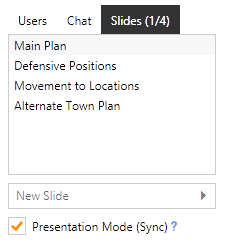
The latest StratSketch update adds a major and frequently requested feature: Slideshows. You can now add slides to your briefing, as well as create copies of existing slides to create alternate strategies. When presentation mode is enabled, all users will follow along with the presenter to each slide.

Slides

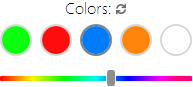
Another feature is the color reset button, which will reset your custom colors to their defaults:

Slides

There have been a few tweaks to the UI layout, as well as many bug fixes. (An important one in particular being that entities do not randomly duplicate anymore.)

If you have any suggestions or comments, check out the StratSketch thread on the World of Tanks forums. Enjoy!

StratSketch Update 2.9

Today I am releasing the StratSketch update for World of Tanks 9.8. I've have added quite a few useful features as well as updated the maps to the latest versions.

Changelog:

  • Added a grayscale color slider.
  • Made multiple tanks count towards the total using the syntax of "#x", which will add # of tanks to the total.
  • Added arrows to the pen tool, as well as "stoppers" to both the line and pen tools. (Indicating the tanks should stop)
  • Added the ability for map owners to kick users from their briefings.
  • Added the ability for maps to be hidden to regular viewers by the map owner and helpers.
  • Implemented an auto-reconnect. If a user becomes disconnected from a (saved) briefing, the client will try to reconnect automatically.
  • Made text a bit easier to read. (Use the note or label styles for best legibility.)
  • Made the select tool auto-select after placing text, making it easier to move it. The textbox is now cleared after placing as well.
  • Fixed a few minor bugs and issues.

If you have any suggestions or comments, check out the StratSketch thread on the World of Tanks forums. Enjoy!

StratSketch Update 2.8

The latest update for StratSketch provides a major useful feature that allows it to scale to screen sizes. This means you will no longer have a small map on a large screen, instead you will see it in nearly fullscreen! A new tool, the shape tool has been added, which allows you to create polygonal shapes and regions.

Changelog:

  • Added scaling to make application (nearly) fullscreen on larger monitors.
  • Added Overlord map.
  • Added the shape tool for creating shaded regions.
  • Move chat to the sidebar to allow for a larger map interface.
  • Many bug fixes and enhancements. This update brings a new coordinate system to allow for scaling across devices. All maps must be converted to this new format, and will be automatically. Certain items such as text and icons may not be in their exact positions or sizes, and may need to be moved.

If you have any suggestions or comments, check out the StratSketch thread on the World of Tanks forums. Enjoy!